
"What is a good typing speed?" is one of the most common questions people ask after taking their first typing test. The short answer is: it depends on who you are and what you need typing for. A speed that is perfectly fine for casual email is too slow for a professional transcriptionist, and a speed that impresses your classmates might be average in a competitive typing community.
This guide gives you concrete WPM benchmarks for different skill levels and situations, explains how typing speed is actually measured, shows you why accuracy matters just as much as raw speed, and helps you set a realistic personal improvement goal.
What Does WPM Mean?
WPM stands for Words Per Minute. It is the standard unit used to measure how quickly someone types. Rather than counting actual words (which vary in length), typing tests use a standardized definition: one word equals 5 characters, including spaces and punctuation.
This standardization exists because "words" in everyday language range from 1 character ("I") to 15+ characters ("acknowledgement"). Without a fixed character count, comparing typing speeds between different texts or different people would be meaningless.
When you see a result like "55 WPM" on a typing test, it means you typed the equivalent of 55 five-character words in one minute.
How Is WPM Calculated?
The formula is straightforward:
WPM = (Total Characters Typed ÷ 5) ÷ Minutes
Example: You type 300 characters in a 1-minute test. Your WPM is: 300 ÷ 5 ÷ 1 = 60 WPM.
Another example: You type 550 characters in a 2-minute test. Your WPM is: 550 ÷ 5 ÷ 2 = 55 WPM.
Notice that the test duration does not change the formula — you simply divide by the actual number of minutes. This is why a 1-minute test and a 5-minute test can both produce comparable WPM scores, although longer tests tend to produce slightly lower scores because fatigue and concentration play a larger role.
Typing Speed Benchmarks by Skill Level
The following table shows general typing speed ranges based on experience and typing method. These are not rigid categories — they are reference points to help you understand where you currently stand and where you might aim next.
| Level | WPM Range | Typical Description |
|---|---|---|
| Beginner | 15–25 WPM | Hunt-and-peck with two fingers, looks at keyboard constantly |
| Below Average | 25–35 WPM | Uses several fingers, still looks down frequently |
| Average | 35–50 WPM | Comfortable with common words, occasional glances at keyboard |
| Above Average | 50–70 WPM | Touch typist, rarely looks down, handles punctuation well |
| Proficient | 70–90 WPM | Fast and consistent, types numbers and symbols confidently |
| Expert | 90+ WPM | Near-automatic typing, competitive speed, very few errors |
What Counts as "Good" Depends on Context
A "good" typing speed is not a single number — it depends on what you need typing for. Here are some realistic benchmarks based on common situations:
For Students
Students who can type 35 to 50 WPM with 90%+ accuracy are well-positioned for school assignments, online research, and timed exams. College students writing essays and research papers benefit from reaching 50 to 65 WPM, which allows them to type almost as fast as they think without constant pauses.
For Everyday Computer Use
If you use a computer for email, messaging, and general browsing, 40 to 55 WPM is comfortable and efficient. At this range, typing does not feel like a bottleneck — you can compose messages and fill out forms without frustration.
For Office and Professional Work
Jobs that involve regular document writing, data entry, or communication typically benefit from 55 to 75 WPM. At this speed, you can type reports, respond to emails, and take meeting notes without falling behind your thought process.
For Specialized Roles
Certain careers require significantly higher speeds:
- Data entry clerks: often expected to type 60 to 80 WPM with very high accuracy.
- Transcriptionists: typically type 75 to 100+ WPM to keep pace with audio.
- Court reporters: use specialized stenography machines and produce output equivalent to 200+ WPM.
- Programmers: raw WPM matters less than accuracy and comfort with special characters like
{ } [ ] ( ) ; : / \.
For Competitive Typing
In typing competitions, top competitors regularly exceed 120 to 150 WPM, with some reaching over 200 WPM in short bursts. These speeds require years of dedicated practice and are not necessary for practical daily use.
Why Accuracy Matters Alongside Speed
A WPM score by itself does not tell the full story. Consider two typists taking the same test:
| Typist | Gross WPM | Accuracy | Errors Per Minute | Effective Output |
|---|---|---|---|---|
| Typist A | 70 WPM | 84% | ~11 errors | Spends significant time on corrections |
| Typist B | 55 WPM | 97% | ~2 errors | Smooth, nearly uninterrupted output |
Typist A appears faster on paper, but each error requires stopping, pressing Backspace, and retyping — which adds roughly 2 to 3 seconds per error. With 11 errors per minute, that is 22 to 33 seconds lost just on corrections. Typist B produces cleaner text with far less wasted effort.
Practical rule: A good typing speed is one where your accuracy is consistently 95% or higher. If your accuracy drops below 90% at a given speed, you are typing faster than your current skill supports — slow down slightly and let your accuracy catch up.
For a deeper exploration of this topic, read our guide on typing speed vs. accuracy and which to prioritize.
Gross WPM vs. Net WPM: What Is the Difference?
Many typing tests report two different WPM numbers:
- Gross WPM: The total number of words you typed, regardless of errors. This measures raw keystroke speed.
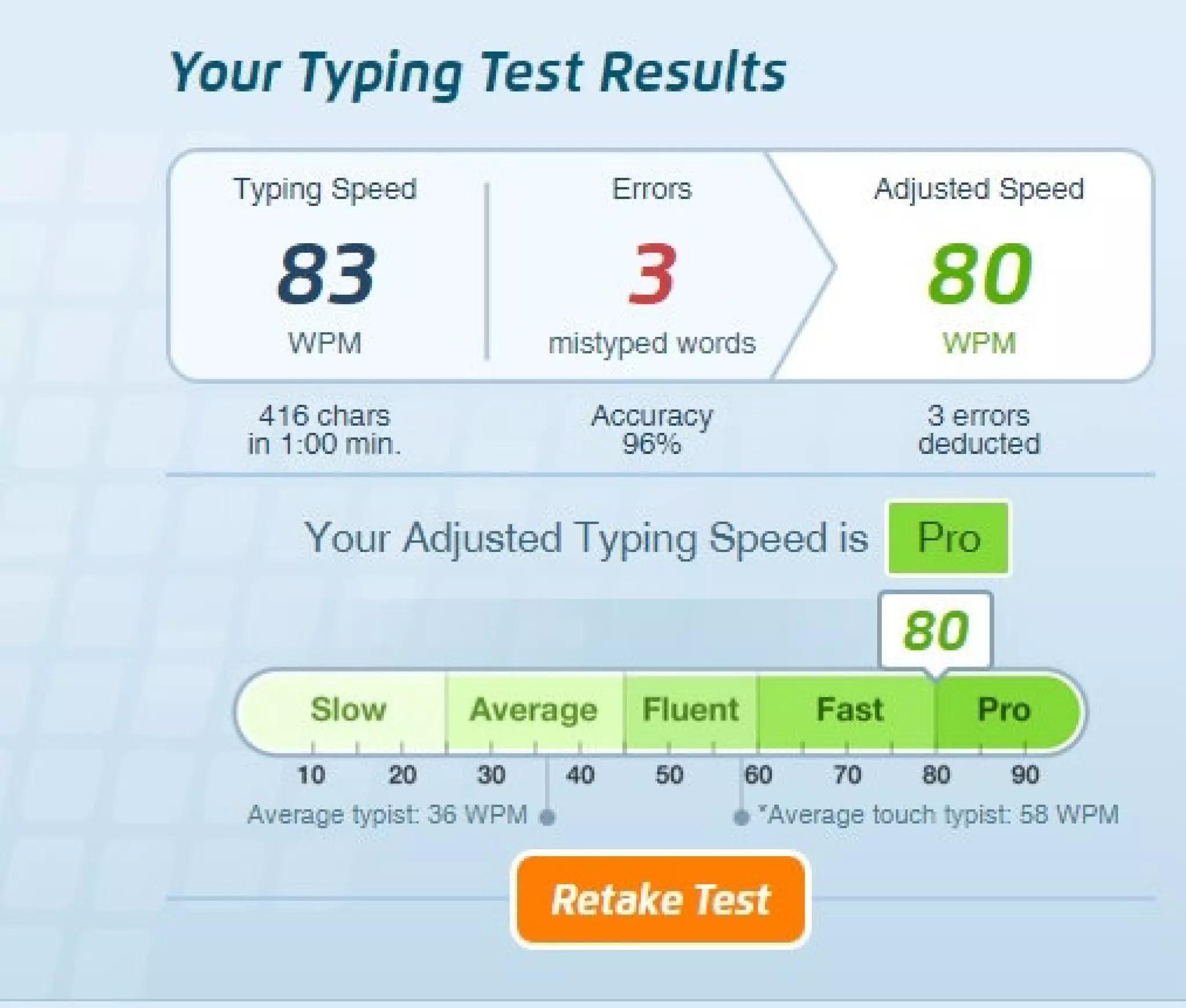
- Net WPM: Gross WPM minus a penalty for errors. This reflects your actual usable typing speed.
The common formula for Net WPM is:
Net WPM = Gross WPM − (Uncorrected Errors ÷ Minutes)
Example: You type at 60 Gross WPM during a 1-minute test but make 5 uncorrected errors. Your Net WPM is: 60 − (5 ÷ 1) = 55 Net WPM.
Net WPM is the more meaningful number for real-world performance because it accounts for mistakes. When setting your speed goal, focus on your Net WPM rather than Gross WPM.
How to Set a Realistic Typing Speed Goal
Rather than aiming for an arbitrary number like "100 WPM," set goals based on your current level and practical needs. Here is a step-by-step approach:
- Take a baseline test. Use a free typing test on Tyspingo and record your WPM and accuracy. Take 3 tests and use the average for a more reliable baseline.
- Identify your accuracy level. If your accuracy is below 90%, your first goal should be improving accuracy rather than speed. Aim for 95%+ before pushing WPM.
- Set a +10 WPM target. Whatever your current average Net WPM, aim to reach 10 WPM higher within 3 to 4 weeks. This is an achievable pace for most people with consistent practice.
- Practice consistently. Dedicate 15 to 20 minutes daily to focused practice. Mix standard typing tests with custom text practice and typing games for variety.
- Retest under the same conditions. Use the same test length and text type when measuring progress. Compare your new average to your baseline.
- Set a new target. Once you reach your goal, set the next +10 WPM target. This incremental approach keeps progress manageable and prevents frustration.
Example Goal-Setting Scenario
| Timeline | WPM Target | Accuracy Target | Focus Area |
|---|---|---|---|
| Baseline | 35 WPM | 88% | Measure starting point |
| Week 2 | 35 WPM | 95%+ | Fix accuracy first — slow down if needed |
| Week 4 | 45 WPM | 95%+ | Gradually increase speed |
| Week 8 | 55 WPM | 96%+ | Practice varied text, add difficult keys |
Practical Steps to Improve Your Typing Speed
Once you have a baseline and a goal, here are the most effective ways to make consistent progress:
- Learn touch typing. If you currently look at the keyboard while typing, switching to touch typing is the single biggest improvement you can make. Your speed ceiling is much higher with proper finger placement. See our touch typing for beginners guide for a step-by-step approach.
- Practice accuracy before speed. Slow down to the pace where you can type with 95%+ accuracy. Once that pace feels comfortable, gradually push faster.
- Target your weakest keys. After each test, note which words or characters caused you to slow down or make errors. Practice those specific patterns. Read more about this approach in our guide on common typing speed mistakes.
- Use varied practice material. Do not only type the same practice text. Mix standard paragraphs, custom text, numbers, punctuation, and timed typing games.
- Follow a structured plan. Our 30-day typing speed practice plan provides a week-by-week framework for steady improvement.
Common Mistakes When Chasing Typing Speed
Avoid these traps that can stall your progress or give you a misleading picture of your ability:
- Comparing yourself to internet leaderboards. Online leaderboards skew toward experienced typists who have practiced for years. Comparing your score to theirs is like a casual jogger comparing themselves to Olympic sprinters. Focus on your own improvement trend instead.
- Taking only short tests. A 15-second burst test will produce a higher WPM than a 3-minute sustained test because fatigue and concentration have not had time to affect you. Use tests of at least 1 minute — ideally 2 to 3 minutes — for a more realistic assessment.
- Memorizing specific test passages. If you take the same typing test repeatedly, you begin to memorize the text, which inflates your score artificially. Use tests with randomized or varied passages.
- Ignoring accuracy. Achieving a high gross WPM while making many errors gives a false sense of speed. Your effective output (Net WPM) is what actually matters for productivity.
- Practicing without a goal. Random practice sessions without measuring results make it difficult to know whether you are improving. Take a baseline test, set a target, and retest regularly.
How Often Should You Test Your Speed?
You do not need to test yourself every single day. Frequent testing can actually create anxiety and focus your attention on the number rather than on improving your technique.
Recommended testing schedule:
- Practice daily: 15 to 20 minutes of focused practice.
- Test every 3 to 5 days: Take a 1-minute or 2-minute test under consistent conditions.
- Review progress weekly: Compare your average over the past week to the previous week.
This approach lets you focus on technique during daily practice while still tracking your progress at regular intervals.
Summary: A Good Typing Speed Is Relative
There is no single number that makes a typing speed "good." What matters is whether your speed is sufficient for what you need to do and whether you are improving over time. A student who moves from 30 to 50 WPM has made a significant, practical improvement. An office worker who moves from 50 to 65 WPM will notice a real difference in daily productivity.
Focus on these three principles: measure your baseline honestly, set an incremental target, and practice consistently with attention to accuracy. The speed will follow.
Frequently Asked Questions
What is the average typing speed?
The average typing speed for adults who use a computer regularly is roughly 40 WPM. People who type frequently for work tend to fall in the 50 to 70 WPM range. These numbers vary widely based on experience, typing method (touch typing vs. hunt-and-peck), and how often someone practices.
Is 40 WPM a good typing speed?
40 WPM is around the average for casual computer users and is adequate for most everyday tasks like email, messaging, and web browsing. However, if your work involves heavy typing — such as data entry, content writing, or programming — aiming for 55 to 70 WPM with high accuracy will make your work noticeably more efficient.
How fast should a student type?
Students who can type 35 to 50 WPM with 90% or higher accuracy are well-positioned for school assignments, online research, and timed exams. College students who regularly type essays and research papers benefit from reaching 50 to 65 WPM, which allows them to keep pace with their thoughts while writing.
How is WPM calculated in a typing test?
WPM stands for Words Per Minute. In standard typing tests, one "word" is defined as 5 characters including spaces and punctuation. The formula is: total characters typed ÷ 5 ÷ minutes. For example, typing 250 characters in one minute equals 50 WPM. Some tests also report Net WPM, which subtracts a penalty for uncorrected errors.
Does accuracy matter more than WPM?
Both matter, but accuracy should come first. A typist who types 70 WPM with 85% accuracy spends significant time correcting errors, resulting in lower effective output than someone typing 55 WPM with 98% accuracy. Aim for at least 95% accuracy before actively pushing for higher speed. Read our detailed guide on WPM vs. accuracy and clean keystrokes for more on this topic.
Can I improve my typing speed as an adult?
Yes. Typing is a motor skill that can be improved at any age through consistent practice. Adults who switch from hunt-and-peck to touch typing and practice 15 to 20 minutes daily typically see significant improvement within 3 to 6 weeks. The key is consistency — short daily sessions are far more effective than occasional long sessions.
Find Out Your Typing Speed
Take a free typing speed test on Tyspingo, see your WPM and accuracy, and use the benchmarks in this guide to set your improvement target.
Check Your WPM Now